.png)
How to Tune Your Truck with an EZ-Lynk Auto Agent 2.0 / 3.0
Updated: Nov 21, 2025
Quick Facts for Tuning Your Truck
Purchase the Device & Include Your VIN Number
Flash Truck BEFORE installing your Exhaust & EGR
Hook up a Battery Charger and set it to 10A
Plug Auto Agent into your OBDII port
Connect to AutoAgent via Wi-Fi
Connect to your Technician
Go to ECU Profiles & Flash Your Tuning
This guide explains how to tune your truck using an EZ-Lynk Auto Agent 2.0 or 3.0. It covers the basics of installing the device and downloading your first set of tunes. The process is straightforward if you take your time and follow the steps carefully.
Step 1: Purchase an EZ-Lynk Device
When you order, provide your truck's VIN number. This step is crucial as it links your truck to the device before it arrives. We ship most orders quickly, so sending your VIN ensures you receive your EZ-Lynk as fast as possible.
Step 2: Tune Your Truck First
Before removing any hard parts, make sure to tune your truck. This precaution helps avoid being stuck with a non-functional truck until we reopen on Monday morning.
Step 3: Connect a Battery Charger
Before starting, connect a battery charger to your truck. It doesn't matter if your batteries are brand new. If you don't have a charger, get one and set it to a 10A charge. New ECMs are sensitive to voltage, and a drop can cause the flash to fail.
Step 4: Download the EZ-Lynk App
Visit the App Store or the Google Play Store to download the EZ-Lynk Auto Agent App. After installation, create an account.
Step 5: Plug the EZ-Lynk into Your OBDII
Insert the EZ-Lynk into your OBDII port under the dash. If you’re flashing a 2018+ Cummins, connect the Bypass Cable simultaneously. This cable only needs to be plugged in while flashing tunes, but leaving it connected is fine.
Step 6: Connect to the Auto Agent
Open your Wi-Fi settings and connect to the Auto Agent via Wi-Fi on your phone or tablet. Once connected, open the app. The Auto Agent should detect your VIN and establish a connection.
You will see the technician you are linked with:
Proven Diesel: Tunes@provendiesel.com
AMDP: ezlynk@amdp.ca
Accept the connection. You will be asked for some information about your truck. Once completed, your tuning files will automatically populate onto your device, and you will receive push notifications as each file arrives.

Step 7: Flash Your Tuning
Now that you’re connected, the app will display the main dashboard. Select the button on the top left of the screen to drop down a menu. Choose your vehicle, and your truck should appear with further options. Select ECU Profiles, where your tune files are stored. You will see a list of files.
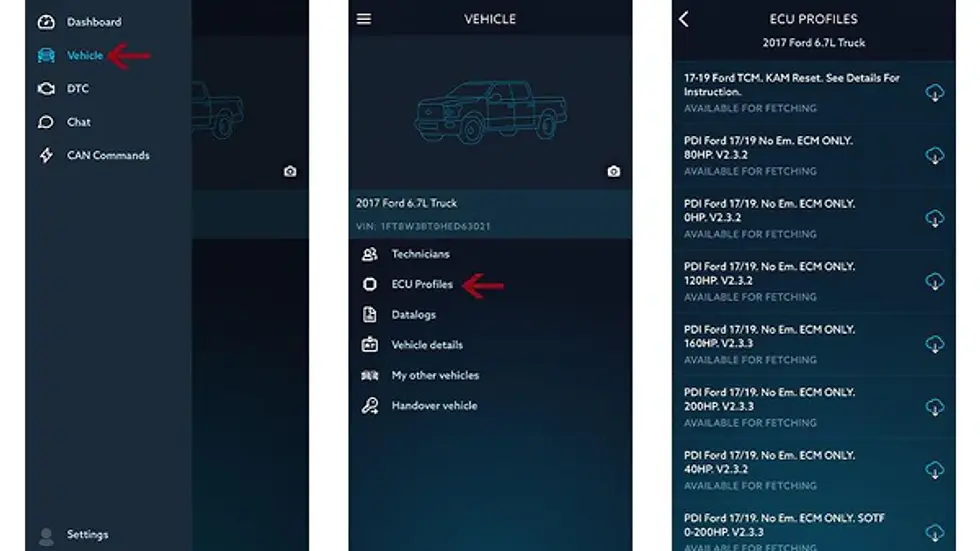
If your tunes have unusual labels, don’t worry; they are easy to decipher. The naming depends on who wrote and uploaded your tunes. Here’s a quick guide:
RMBL: Rumble idle - turbo veins open at idle
HISS: Hiss idle - turbo veins closed at idle
LBF: Low Boost Fuel - recommended for larger turbos
HOT: Increased fuel timing - for larger injectors
SOTF: Switch on the Fly - requires the correct switch
AFR: Revised Air/Fuel Ratio - less smoke
CP3: Tune for trucks with a CP3 Conversion
IA88: Tune for trucks with a CP3 or CP4
AGRTHR: Aggressive throttle/increased sensitivity
EGT: EGT Probe remapped for PID display (requires EGT probe)
RPM: Increased RPM limiter
V (version): Higher version number = most recent file
Transmission Tuning Options:
V70 (Cummins)/SOFT (Ford): Closest to stock tuning with improved line pressure
V67 (Cummins)/MED (Ford): Balance between stock and race trans tune
V58 (Cummins)/AGR (Ford): Aggressive lockup and shift points for maximum power
L: Torque converter lockup (e.g., V67L)
LP: Commanded line pressure in trans tuning (e.g., 180LP)
RVMX: Transmission tuning for Revmax valve body
RNDY: Transmission tuning for Randy’s Babymaker 1000/2000 valve body
Downloading Tune Files:
Phone: Requires cell service to download tune files.
Tablet: Disconnect Wi-Fi from the Auto Agent to download files, then reconnect to the EZ-Lynk Wi-Fi.
After downloading, press install. The EZ-Lynk will guide you through a Key On, Key-Off Procedure, and the truck will flash. Once the tune is installed, it will display Installed under the tune file. If you have a Ford or GM, you can flash your TCM Tuning. For Dodge, TCM Tuning is included with Engine Tuning and requires only one flash.
Note: It will only show the last tune installed. This may be confusing if you install TCM Tuning, as only one will show as installed, even if both have been flashed. You cannot overwrite an Engine Tune with a TCM Tune and vice versa.
Once the truck is flashed, you are good to go. Use the chat feature to connect with your technician for any technical questions. You can also send Data Logs to diagnose issues without visiting a shop.
If you don’t plan to monitor parameters on your phone, unplug the EZ-Lynk. You only need it connected when monitoring, flashing, or diagnosing.
The main dashboard allows you to view parameters. You can adjust and move tiles to your preference by holding your finger down on any tile and selecting from a list.
Support Pack Only
If you already own an EZ-Lynk Auto Agent and purchased a support package, you can add a technician by clicking the top left button in the app and selecting 'Technicians.' There is a plus sign under this selection to manually type in any technician's email.
If the tuner has auto-populated the files, the Auto Agent will detect your truck and push all the tune files once linked.
Now that you’re all set, shut down the truck and install your EGR & Exhaust Components. If you have any questions, feel free to reach out. We are happy to assist you via email or phone.
"Powell, Jordan. "How to Tune Your Truck with a EZ-Lynk Auto Agent 2.0 / 3.0." Dirty Diesel Customs, 19 Feb. 2020,


Comments